Getting Started with Drizzle ORM on Next.js
Posted on: August 11 2024
By David Becker

Get the latest articles delivered to your inbox. No spam, unsubscribe anytime.
There is no doubt that Drizzle ORM is quickly becoming one of the top ORM tools for accessing databases and is quickly becoming a great fit for Next.js
Drizzle brings a simplified SQL like ORM approach to relational databases and is serverless and edge ready which aligns with Next.js hosting strategies.
In this article I'll take a step by step approach to getting started building a Next.js app using Drizzle ORM, including:
After converting several apps over to use Drizzle ORM, there are a few things I've learned along the way that can help anyone starting out.
On that note, let's get started with Drizzle!
In short, Drizzle ORM is really not much different than any ORM before it but where it sets itself apart is in the following areas:
In my experience, Drizzle has solved some of the biggest hurdles in using ORM tools I've faced over the years. including:
Overall, it's a very intuitive ORM once you get the hang of it.
If you don't already have a Next.js application set up, use the following command to generate a new project.
1npx create-next-app@latest
The generator will prompt for some configuration details, I'll be using the following:
1What is your project named? <your-project-name>2Would you like to use TypeScript? Yes3Would you like to use ESLint? Yes4Would you like to use Tailwind CSS? Yes5Would you like to use `src/` directory? No6Would you like to use App Router? (recommended) Yes7Would you like to customize the default import alias (@/*)? No8What import alias would you like configured? @/*
Once that completes, change directory into the new Next.js project folder.
1cd <project-name>
Next, install the packages for the tutorial. I'll be using MySql Database for this example.
1npm i drizzle-orm@^0.32.1 @paralleldrive/cuid2@^2.2.2 mysql2@^3.10.1
1npm i -D dotenv@^8.2.0 @faker-js/faker@^8.4.1 drizzle-kit@^0.24.0
Also, the project generator will use the default path alias in the tsconfig.json file.
1{2 "compilerOptions": {3 "paths": {4 "@/*": [5 "./*"6 ]7 }8 }9}
.env.local file and just replace the values with your database connection details.TheDATABASE_URLenvironment key is formatted as followsmysql://[USER]:[PASSWORD]@[HOST]:[PORT]/[SCHEMA_NAME].
Here's an example using a database schema called drizzle-demo and simply connecting to localhost.
1DATABASE_URL=mysql://joeadmin:password@localhost:3306/drizzle-demo
When deploying to a production env, the values should be changed to point to your remote database in the .env.production file.
Also, just remember to add these files to .gitignore and make sure they are not commited to git.
1.env2.env.*34# if using workspaces5**/.env6**/.env.*
Now that everything is set up, let's add some of the files we'll need. For this tutorial. Here's the directory structure for this tutorial:
1└── <project-root>2 ├── db3 │ ├── drizzle (out dir)4 │ ├── index.ts5 │ ├── schema.ts6 │ ├── seed.ts7 │ └── types.ts8 └── drizzle.config.ts
Drizzle uses a single configuration file called drizzle.config.ts and is usually placed in the project directory.
Note that the config is importing dotenv we installed earlier to set the proper environment values. This is important for migration rollouts.
1import 'dotenv/config';2import { defineConfig } from 'drizzle-kit';34export default defineConfig({5 schema: './db/schema.ts',6 out: './db/drizzle',7 dialect: 'mysql',8 dbCredentials: {9 url: `${process.env.DATABASE_URL}`10 },11});
The schema file(s) are where all of the table and relationship mappings will be defined.
Drizzle is very flexible and makes it easy to separate schema into multiple files as needed, for example:
For this example, I'll create the following tables in a single schema file.
The tables will have the followig relationships:
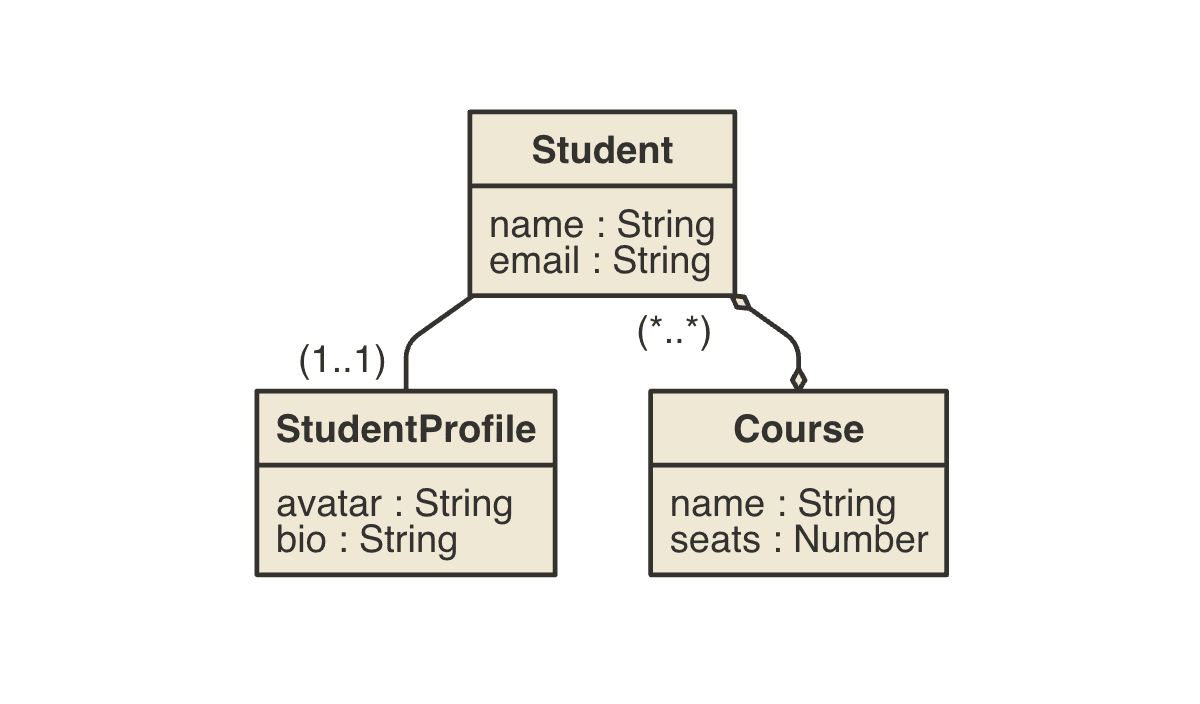
The tables will use a cuid for primary keys, which is now officially supported by Drizzle using the $defaultFn function. You could easily use uuid if you prefer.
If you choose to use int primary keys, consider using bigint in MySQL if you anticipate your table will grow to a large row count.
1import {2 mysqlTable,3 primaryKey,4 varchar,5 longtext,6 int,7} from 'drizzle-orm/mysql-core';8import { relations } from 'drizzle-orm';9import { createId } from '@paralleldrive/cuid2';1011export const students = mysqlTable('student', {12 id: varchar('id', { length: 128 })13 .primaryKey()14 .notNull()15 .$defaultFn(() => createId()),16 name: varchar('name', { length: 255 }).notNull(),17 email: varchar('email', { length: 255 }).notNull(),18});1920export const courses = mysqlTable('course', {21 id: varchar('id', { length: 128 })22 .primaryKey()23 .notNull()24 .$defaultFn(() => createId()),25 name: varchar('name', { length: 255 }).notNull(),26 seats: int('seats').default(30),27});2829export const courseRelations = relations(courses, ({ many }) => ({30 students: many(studentsToCourses),31}));3233export const studentRelations = relations(students, ({ one, many }) => ({34 courses: many(studentsToCourses),35 profile: one(studentProfiles, {36 fields: [students.id],37 references: [studentProfiles.studentId],38 }),39}));4041export const studentsToCourses = mysqlTable(42 'student_courses',43 {44 studentId: varchar('student_id', { length: 128 })45 .notNull()46 .references(() => students.id),47 courseId: varchar('course_id', { length: 128 })48 .notNull()49 .references(() => courses.id, {50 onDelete: 'cascade',51 onUpdate: 'cascade',52 }),53 },54 (t) => ({55 pk: primaryKey({ columns: [t.studentId, t.courseId] }),56 })57);5859export const studentsToCoursesRelations = relations(60 studentsToCourses,61 ({ one }) => ({62 course: one(courses, {63 fields: [studentsToCourses.courseId],64 references: [courses.id],65 }),66 student: one(students, {67 fields: [studentsToCourses.studentId],68 references: [students.id],69 }),70 })71);7273export const studentProfiles = mysqlTable('student_ profile', {74 id: varchar('id', { length: 128 })75 .primaryKey()76 .notNull()77 .$defaultFn(() => createId()),78 bio: longtext('bio'),79 avatar: varchar('avatar', { length: 255 }),80 studentId: varchar('student_id', { length: 128 }).references(81 () => students.id,82 {83 onDelete: 'cascade',84 onUpdate: 'cascade',85 }86 ),87});8889export const studentProfileRelations = relations(90 studentProfiles,91 ({ one }) => ({92 student: one(students, {93 fields: [studentProfiles.studentId],94 references: [students.id],95 }),96 })97);
One thing that really helps in designing a drizzle schema is to use a consistent naming convention for tables and relationships.
Every table relationship has two sides and by naming things with a pattern it will help determine relations.
This will also define the query relations path as well see in the next section.
Here's a very useful naming convention:
An example of this is in the schema, where the students and courses tables have bi-directional relations pointing back to each other.
1// ...23export const courseRelations = relations(courses, ({ many }) => ({4 students: many(studentsToCourses),5}));67export const studentRelations = relations(students, ({ one, many }) => ({8 courses: many(studentsToCourses),9 profile: one(studentProfiles, {10 fields: [students.id],11 references: [studentProfiles.studentId],12 }),13}));1415// ...
Since they share a many-to-many relations to each other, they need to share a common join table to link the foreign keys of both tables.
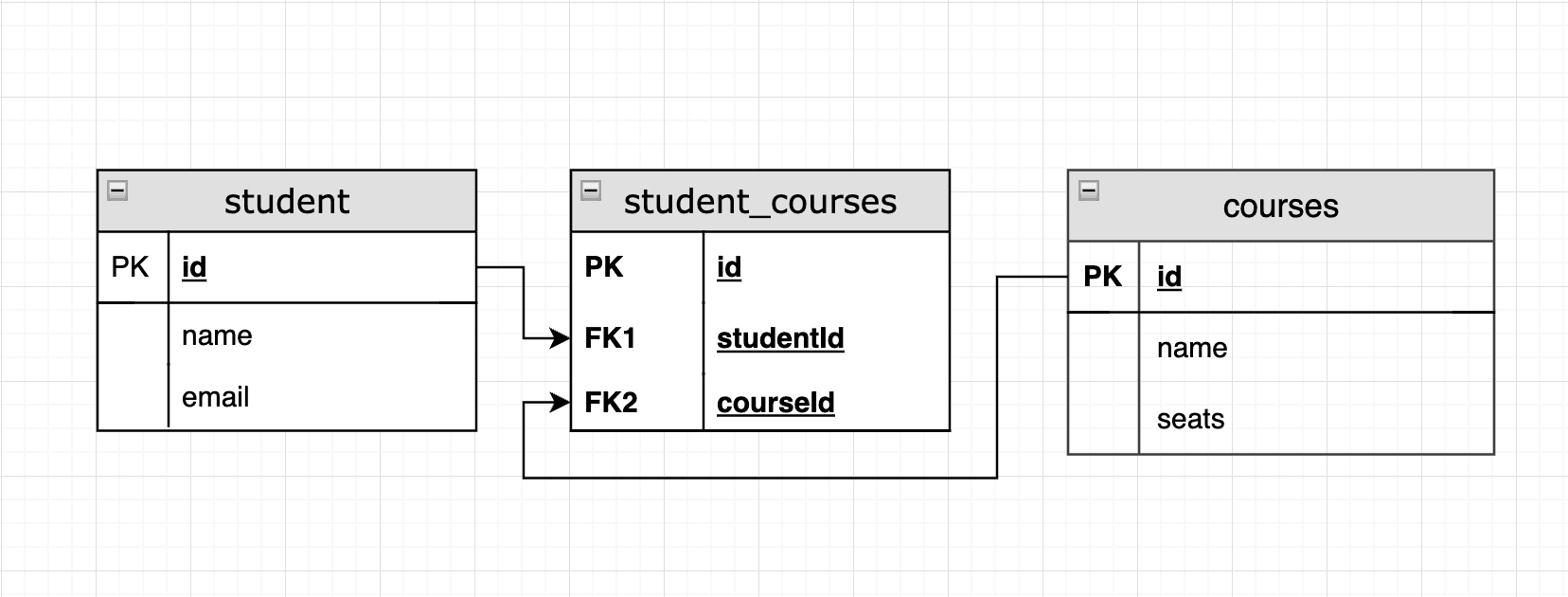
This join table is defined in the studentsToCourses table and it too has a studentsToCoursesRelations definition.
By defining a relations on the join table, it lets Drizzle know what relations are available to include in queries.
We'll see an example of this in the next section, in the client side of the tutorial.
One of the things that make Drizzle a little easier to manage is that there are really only two main types it will create based on the schema files.
These need to be manually created and exported using:
1import {2 courses,3 students,4 studentProfiles,5} from './schema';67export type Student = typeof students.$inferSelect;8export type StudentProfile = typeof studentProfiles.$inferSelect;9export type Course = typeof courses.$inferSelect;1011export type NewStudent = typeof students.$inferInsert;12export type NewStudentProfile = typeof studentProfiles.$inferInsert;13export type NewCourse = typeof courses.$inferInsert;
It's a little easier to create an index.ts for exporting the database connection rather than including it in the same schema module. This way any schema modules can be passed directly into the connection builder function.
Note: If the schema modules are not set in theschemafield when creating the connection, they will not be available when runningqueryoperations. You can still useselectbut query needs to have a reference to the schema exported tables and relations.
A couple things to note, include:
schema field using an array.1import { drizzle } from 'drizzle-orm/mysql2';2import mysql from 'mysql2/promise';3import * as schema from './schema';45export * from './types';67const poolConnection = mysql.createPool(`${process.env.DATABASE_URL}`);89export const db = drizzle(poolConnection, {10 schema: [schema],11 mode: 'default',12});
Now the query operator will have a reference to schema, for example:
1import {db} from '@/db';23const results = await db.query.students(...);4const results = await db.query.courses(...);
Also the types are now available when creating new entities.
1import {db, NewStudent} from '@/db';23const newStudent: NewStudent = {4 name: 'Joe',5 email: 'joe@example.com'6}78const resultId = await db.insert(users).values(newStudent).$returningId();
So now that we have all of the configuration and schema in place, let's create the first drizzle migration to initialize the database.
For local development, the push command can be used directly to create all the schema tables.
1npx drizzle-kit push
However, if you're planning to deploy this to a production server, there should be a migration history to keep local and remote schema tables in sync.
Sometimes it's helpful to add some helper scripts to call the underlying drizzle-kit commands.
1{2 "scripts": {3 "db:push": "drizzle-kit push --config=./drizzle.config.ts",4 "db:generate": "drizzle-kit generate",5 "db:migrate": "drizzle-kit migrate",6 "db:seed": "tsx ./db/seed.ts",7 "db:studio": "drizzle-kit studio"8 }9 }
Using the db:generate script command and passing a --name argument will create the first migration inside of the /db/drizzle directory.
1npm run db:generate -- --name initialize
Now that the first migration is added, use the db:migrate command to push the new schema to the database.
1npm run db:migrate
This command will install all of the schema tables with the addition of a table called __drizzle_migrations. The migrate command will use this table to orchestrate synchonizing the changes.
Any time you need to make any changes to the schema, just run the db:generate script and give it a name to identify the changes and then run db:migrate to push the updates.
Note: Make sure to commit any of these changes so they are not lost and can be applied to production when deploying.
Seeding is an important step in development and will provide your database with some useful data to develop against.
Add the following seed code to generate some students and courses. This will also give some idea how to insert relationship data which can be a little tricky at first.
1import { faker } from '@faker-js/faker';2import { db, NewCourse, NewStudent, NewStudentProfile } from '@/db';3import {4 courses,5 studentProfiles,6 students,7 studentsToCourses,8} from './schema';910async function main() {11 console.log(`Start seeding ...`);1213 const courseNames = [14 'Finance',15 'History 1A',16 'History 1B',17 'Economics',18 'Computer Science',19 'JavaScript Intro',20 'Advanced React',21 'Node.js Intro',22 'Python AI',23 'Ecommerce',24 ];2526 const courseNameInserts: NewCourse[] = courseNames.map((c) => ({27 name: c,28 }));2930 // add courses31 const courseResultIds = await db32 .insert(courses)33 .values(courseNameInserts)34 .$returningId();3536 const randomStudents: NewStudent[] = [];3738 for (let i = 0; i < 50; i++) {39 const randomEmail = faker.internet.email();40 let fullName = randomEmail.split('@')[0].replace(/(_|\.)/, ' ');4142 randomStudents.push({43 name: fullName,44 email: randomEmail.toLocaleLowerCase(),45 });46 }4748 // add students, courses, profile49 const randomStudentResultIds = await db50 .insert(students)51 .values(randomStudents)52 .$returningId();5354 for (let i = 0; i < randomStudentResultIds.length; i++) {55 const nextId = randomStudentResultIds[i].id;5657 await db.insert(studentsToCourses).values({58 studentId: nextId,59 courseId: courseResultIds[Math.floor(Math.random() * 10)].id,60 });6162 await db.insert(studentProfiles).values({63 studentId: nextId,64 bio: faker.lorem.paragraphs()65 } as NewStudentProfile);66 }67 console.log('Seeding finished...');68 process.exit(0);69}7071console.log('Starting drizzle seed...');7273main().catch((e) => {74 console.error(e);75 process.exit(0);76});
Save the code and run the following command to seed the database.
1npm run db:seed
Drizzle has a Studio application that can be started to view all of the database tables and data.
1npm run db:studio
Once it's running you'll see a link to open Drizzle Studio.
1Drizzle Studio is up and running on https://local.drizzle.studio
Drizzle Studio is a great tool since it will also show relationship data which is useful for development. You can also run and execute select statements.
So now that all of the database and seeding is completed, we can focus on creating a few pages using the app router to access and view the data, including:
Here's the project structure of the client pages we'll be creating.
1└── <project-root>2 ├── app3 │ ├── demo4 │ │ ├── students5 │ │ │ ├── page.tsx6 │ │ │ └── [id]7 │ │ │ └── page.tsx8 │ │ └── courses9 │ │ ├── page.tsx10 │ │ └── [id]11 │ │ └── page.tsx12 │ └── layout.tsx13 └── lib14 └── service15 ├── courses.ts16 └── students.ts
Let's start off with creating some services to access the database. These will just be standard async functions that can be used in RSC components on the server side.
Here's the service to access students data.
1import { db } from '@/db';2import { students, studentsToCourses, studentProfiles } from '@/db/schema';3import { eq } from 'drizzle-orm';45export async function findStudents() {6 try {7 const students = await db.query.students.findMany();8 return students;9 } catch (e: unknown) {10 return [];11 }12}1314export async function findStudentById(studentId: string) {15 try {16 const student = await db.query.students.findFirst({17 with: {18 profile: true,19 },20 where: eq(students.id, studentId),21 });22 return student;23 } catch (e: unknown) {24 return undefined;25 }26}2728export async function findStudentsByCourseId(courseId: string) {29 try {30 const students = await db.query.studentsToCourses.findMany({31 with: {32 student: true,33 },34 where: eq(studentsToCourses.courseId, courseId),35 });36 return students.map((sc) => ({ ...sc.student }));37 } catch (e: unknown) {38 return [];39 }40}4142export async function findCoursesByStudentId(studentId: string) {43 try {44 const courses = await db.query.studentsToCourses.findMany({45 with: {46 course: true,47 },48 where: eq(studentsToCourses.studentId, studentId),49 });50 return courses.map((sc) => ({ ...sc.course }));51 } catch (e: unknown) {52 return [];53 }54}5556export async function findStudentProfile(studentId: string) {57 try {58 const profile = await db.query.studentProfiles.findFirst({59 where: eq(studentProfiles.studentId, studentId),60 });61 return profile;62 } catch (e: unknown) {63 return undefined;64 }65}
And here's the service to access the courses data.
1import { db } from '@/db';2import { courses } from '@/db/schema';3import { eq } from 'drizzle-orm';45export async function findCourses() {6 try {7 const courses = await db.query.courses.findMany();8 return courses;9 } catch (e: unknown) {10 return [];11 }12}1314export async function findCourseById(courseId: string) {15 try {16 const course = await db.query.courses.findFirst({17 where: eq(courses.id, courseId),18 });19 return course;20 } catch (e: unknown) {21 return undefined;22 }23}
The layout adds some navigation links for the top of the page and imports the global.css Tailwind CSS file that comes with Next.js generator.
1import type { Metadata } from "next";2import Link from 'next/link';3import { Inter } from "next/font/google";4import "./globals.css";56const inter = Inter({ subsets: ["latin"] });78export const metadata: Metadata = {9 title: "Drizzle Demo",10 description: "Drizzle client example of accessing data",11};1213export default function RootLayout({14 children,15}: Readonly<{16 children: React.ReactNode;17}>) {18 return (19 <html lang="en">20 <body className={inter.className}>21 <div>22 <div className="flex justify-evenly p-5 bg-gray-100 text-lg font-bold">23 <Link href="/demo/students">Students</Link>24 <Link href="/demo/courses">Courses</Link>25 </div>26 {children}27 </div>28 </body>29 </html>30 );31}
These two pages will query the student and course data that was seeded earlier and provide a main listing.
Student listing page view:
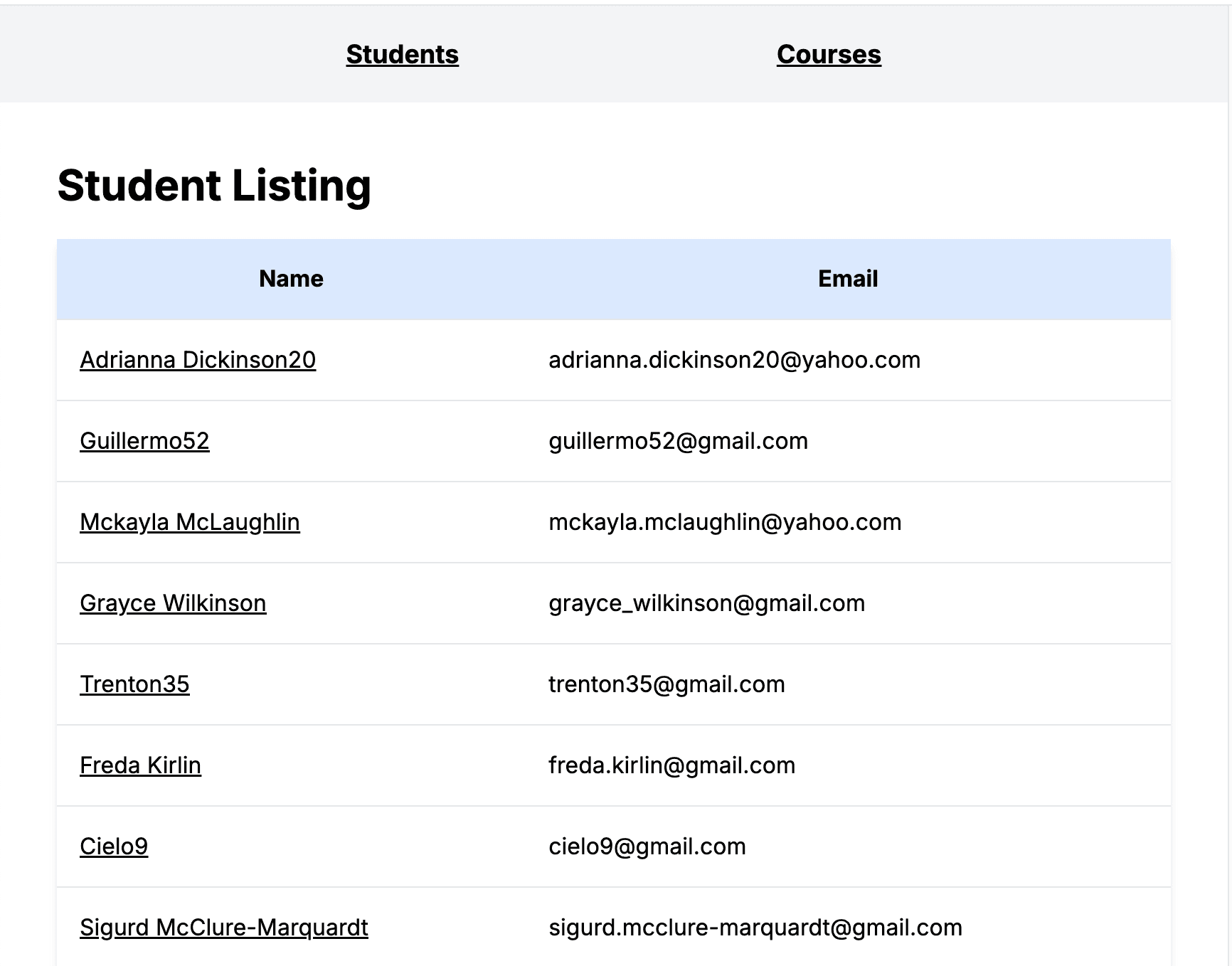
1import { findStudents } from '@/lib/service/students';2import Link from 'next/link';34export default async function Page() {5 const students = await findStudents();67 return (8 <div className="flex-col space-y-5 p-10">9 <h2>Student Listing</h2>10 <table className="table-auto w-full shadow-md rounded-md">11 <thead>12 <tr className="bg-blue-100">13 <th className="p-4 font-bold">Name</th>14 <th className="p-4 font-bold">Email</th>15 </tr>16 </thead>17 <tbody>18 {students.map((student, i) => {19 return (20 <tr key={`${student.id}-${i}`}>21 <td className="border-t p-4"><Link href={`/demo/students/${student.id}`}>{student.name}</Link></td>22 <td className="border-t p-4">{student.email}</td>23 </tr>24 );25 })}26 </tbody>27 </table>28 </div>29 );30}
Course listing page view:
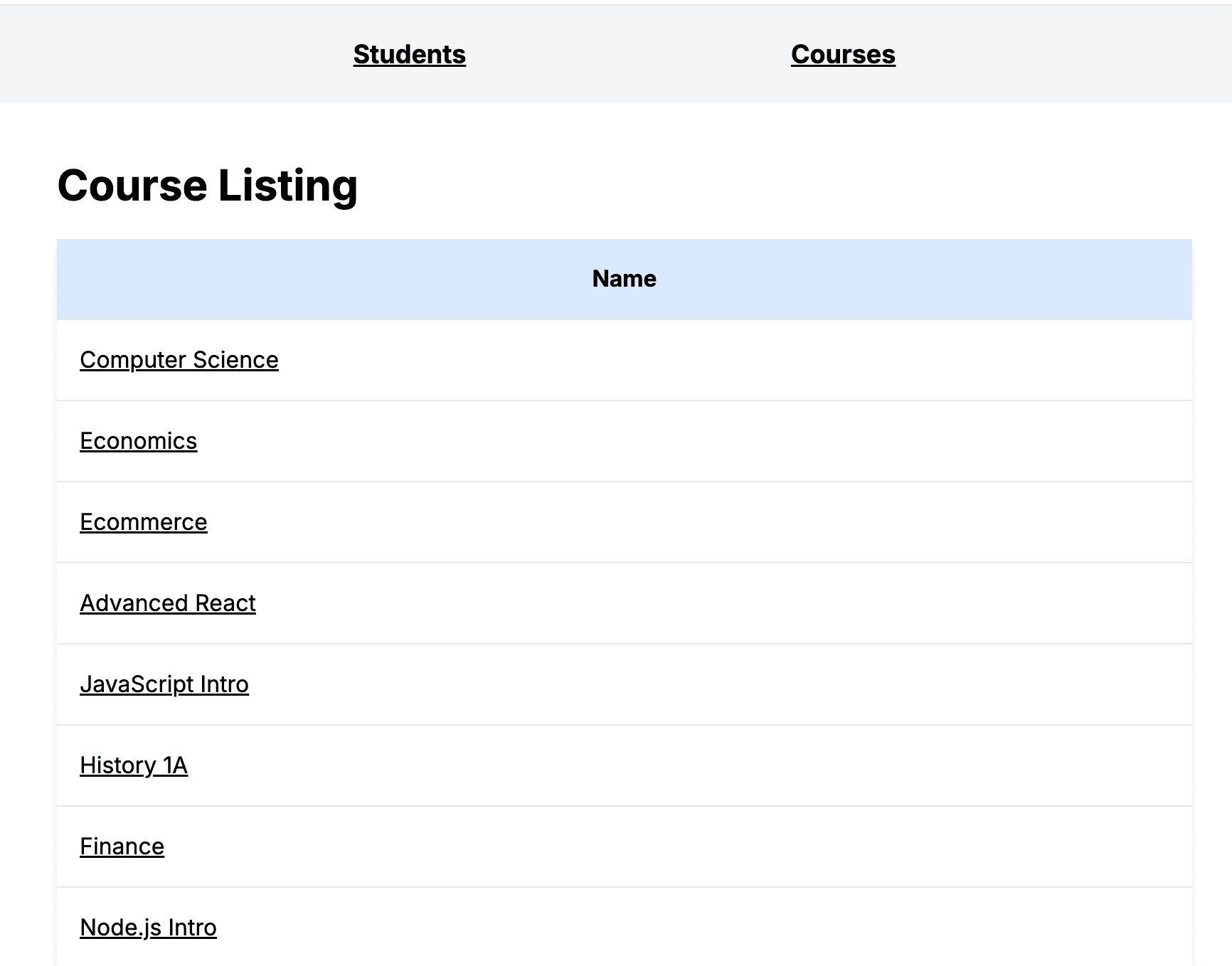
1import { findCourses } from '@/lib/service/courses';2import Link from 'next/link';34export default async function Page() {5 const courses = await findCourses();67 return (8 <div className="flex-col space-y-5 p-10">9 <h2>Course Listing</h2>10 <table className="table-auto w-full shadow-md rounded-md">11 <thead>12 <tr className="bg-blue-100">13 <th className="p-4 font-bold">Name</th>14 </tr>15 </thead>16 <tbody>17 {courses.map((course, i) => {18 return (19 <tr key={`${course.id}-${i}`}>20 <td className="border-t p-4">21 <Link href={`/demo/courses/${course.id}`}>{course.name}</Link>22 </td>23 </tr>24 );25 })}26 </tbody>27 </table>28 </div>29 );30}
Both of listing pages will provide links to access the details by using the table id field.
Student detail page view:
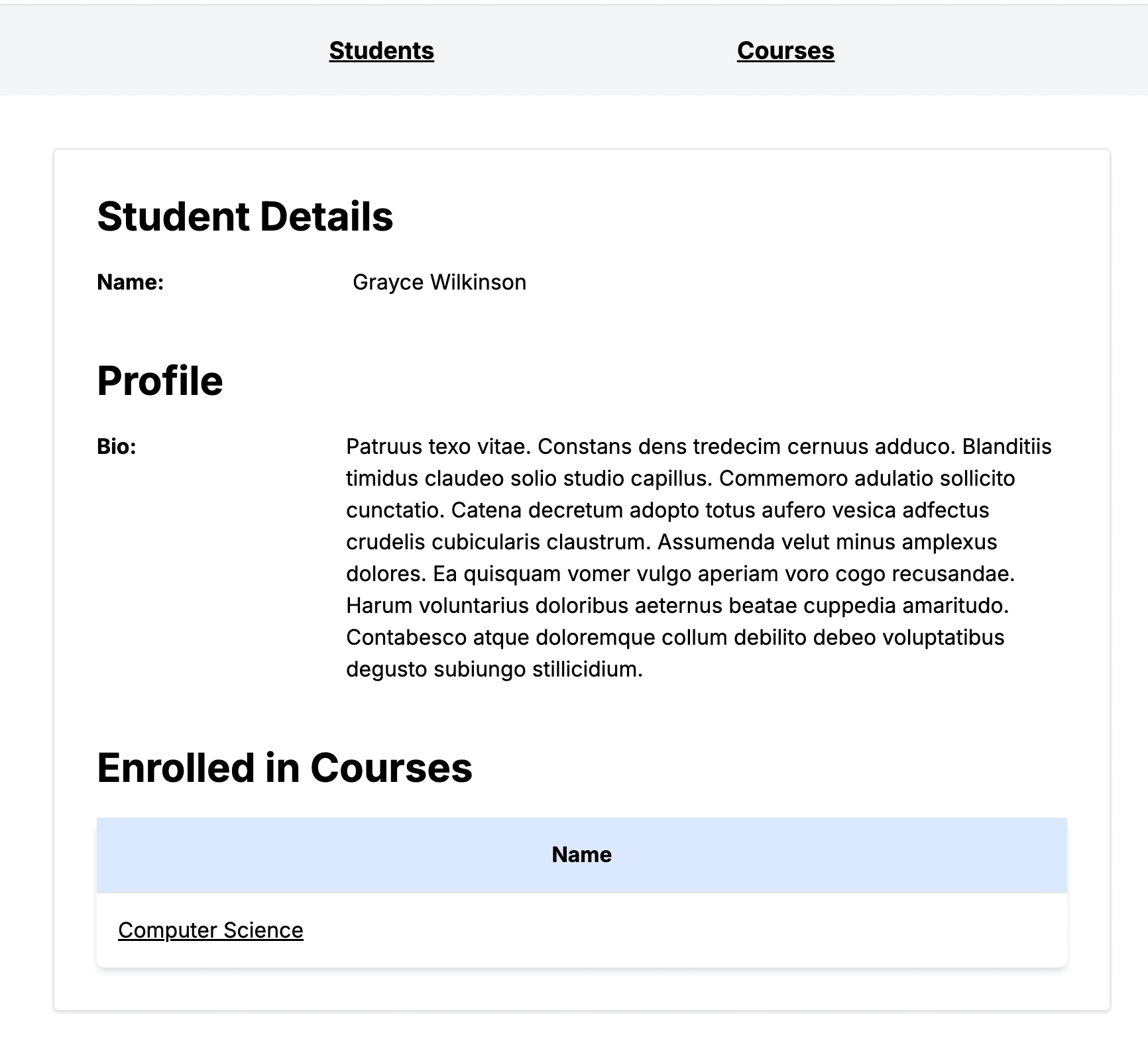
1import {2 findCoursesByStudentId,3 findStudentById,4} from '@/lib/service/students';5import Link from 'next/link';67export default async function Page({8 params: { id },9}: {10 params: { id: string };11}) {12 const student = await findStudentById(id);1314 const courses = student ? await findCoursesByStudentId(student.id) : [];1516 return (17 <div>18 <div className="flex-col space-y-5 p-10">19 <div className="border border-gray-200 flex flex-col items-stretch rounded shadow">20 <div className="p-3">21 {student ? (22 <div className="flex flex-col p-5 space-y-5">23 <h2>Student Details</h2>24 <div className="w-1/2 grid grid-cols-2 gap-5">25 <div className="font-bold">Name:</div>26 <div>{student.name}</div>27 </div>28 <br/>29 <h2>Profile</h2>30 <div className="grid grid-cols-12 gap-5">31 <div className="col-span-3 font-bold">Bio:</div>32 <div className="col-span-9">{student?.profile?.bio}</div>33 </div>34 <br/>35 <h2>Enrolled in Courses</h2>36 {courses && (37 <div className="w-full">38 <table className="table-auto w-full shadow-md rounded-md">39 <thead>40 <tr className="bg-blue-100">41 <th className="p-4 font-bold">Name</th>42 </tr>43 </thead>44 <tbody>45 {courses.map((course, i) => {46 return (47 <tr key={`${course.id}`}>48 <td className="border-t p-4">49 <Link href={`/demo/courses/${course.id}`}>50 {course.name}51 </Link>52 </td>53 </tr>54 );55 })}56 </tbody>57 </table>58 </div>59 )}60 </div>61 ) : (62 <div>Student not found</div>63 )}64 </div>65 </div>66 </div>67 </div>68 );69}
Course detail page view:
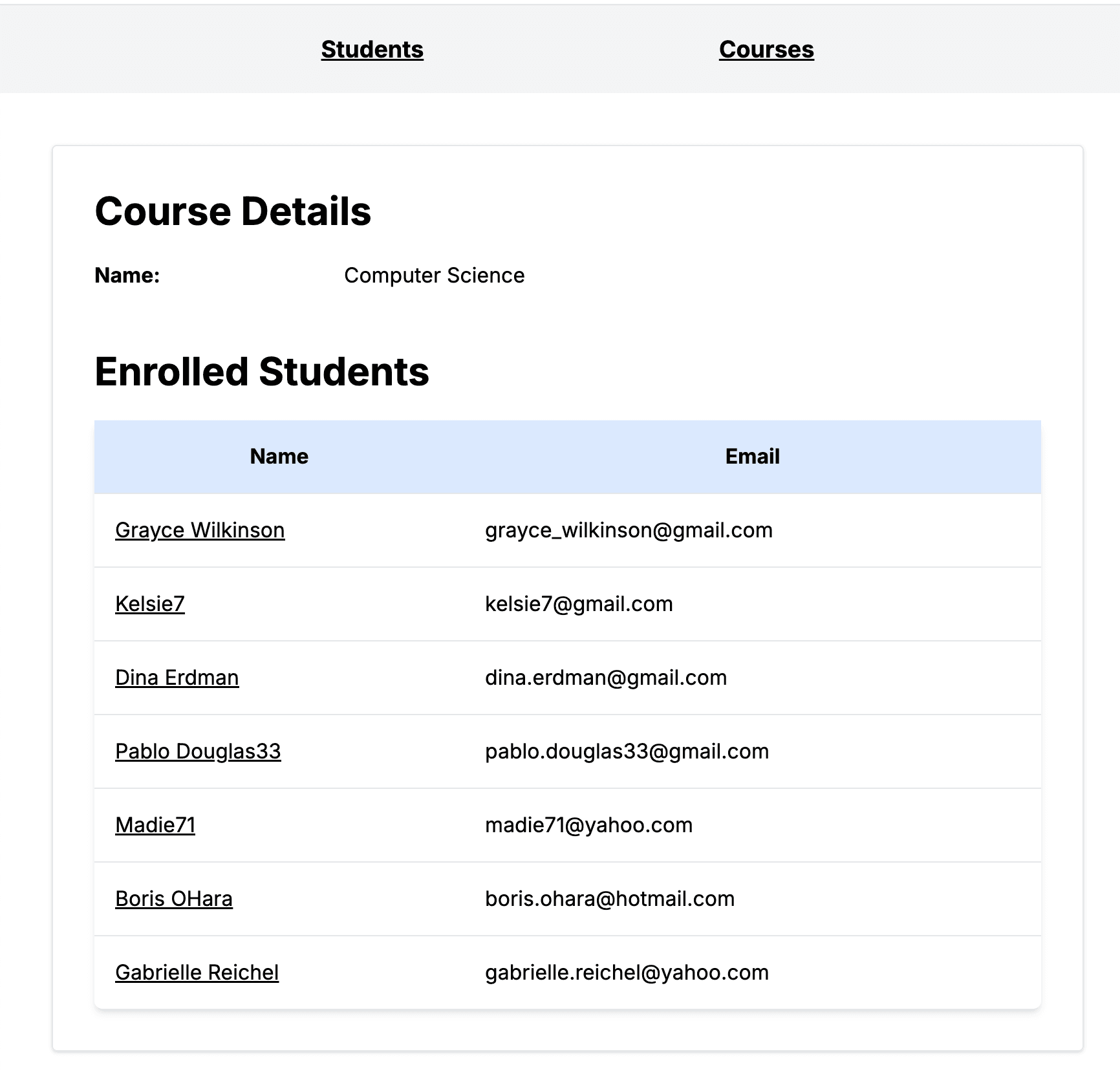
1import { findCourseById } from '@/lib/service/courses';2import { findStudentsByCourseId } from '@/lib/service/students';3import Link from 'next/link';45export default async function Page({6 params: { id },7}: {8 params: { id: string };9}) {10 const course = await findCourseById(id);1112 const students = course ? await findStudentsByCourseId(course.id) : [];1314 return (15 <div>16 <div className="flex-col space-y-5 p-10">17 <div className="border border-gray-200 flex flex-col items-stretch rounded shadow">18 <div className="p-3">19 {course ? (20 <div className="flex flex-col p-5 space-y-5">21 <h2>Course Details</h2>22 <div className="w-1/2 grid grid-cols-2 gap-5">23 <div className="font-bold">Name:</div>24 <div>{course.name}</div>25 </div>26 <br/>27 <h2>Enrolled Students</h2>28 {students && (29 <div className="w-full">30 <table className="table-auto w-full shadow-md rounded-md">31 <thead>32 <tr className="bg-blue-100">33 <th className="p-4 font-bold">Name</th>34 <th className="p-4 font-bold">Email</th>35 </tr>36 </thead>37 <tbody>38 {students.map((student, i) => {39 return (40 <tr key={`${student.id}-${i}`}>41 <td className="border-t p-4">42 <Link href={`/demo/students/${student.id}`}>43 {student.name}44 </Link>45 </td>46 <td className="border-t p-4">{student.email}</td>47 </tr>48 );49 })}50 </tbody>51 </table>52 </div>53 )}54 </div>55 ) : (56 <div>Course not found</div>57 )}58 </div>59 </div>60 </div>61 </div>62 );63}
Now that all of the pages are in place, the Next.js app can be started to view the pages.
Start Next.js and point your browser to localhost:3000/students.
1npm run dev
So now that we've seen how to not only setup Drizzle but also run several SQL commands to access the database, this should provide a good idea how to use it in your own Next.js project going forward.
After converting a couple apps over to Drizzle, it has become one of my go to database ORMs of choice. It has really brought a lot of flexibility into the mix. Drizzle definitely makes it a little easier to maintain and deploy as well.
I hope this has helped and was informative.